
PX7 Markdown Web Clipper
A native menu-bar Markdown web clipper for Safari on Mac.
Open an article in Safari, click the menu-bar icon, and save the readable text as a clean .md file with its title, source, date and images.
No browser extension or Obsidian account. Choose any Mac folder and keep an offline copy for any Markdown app.
Notarized by Apple · 2.2 MB · 7-day free trial, no card · €10 once · up to 7 Macs · Safari · macOS 14+ · ZIP
Homebrew
Install the notarized app from the command line.
brew install --cask px7digital/tap/px7-markdown-web-clipperThe public PX7 tap pins version 1.0.10 and verifies the downloaded ZIP against its published SHA-256 checksum. Homebrew installs the same seven-day trial as the direct download above. The dedicated distribution and support repository documents the release and provides a public issue tracker.
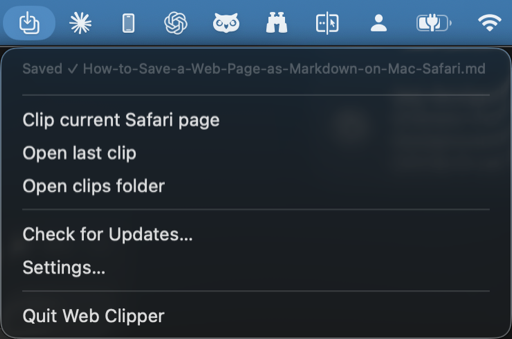
The actual menu
Clip the article without opening another app.
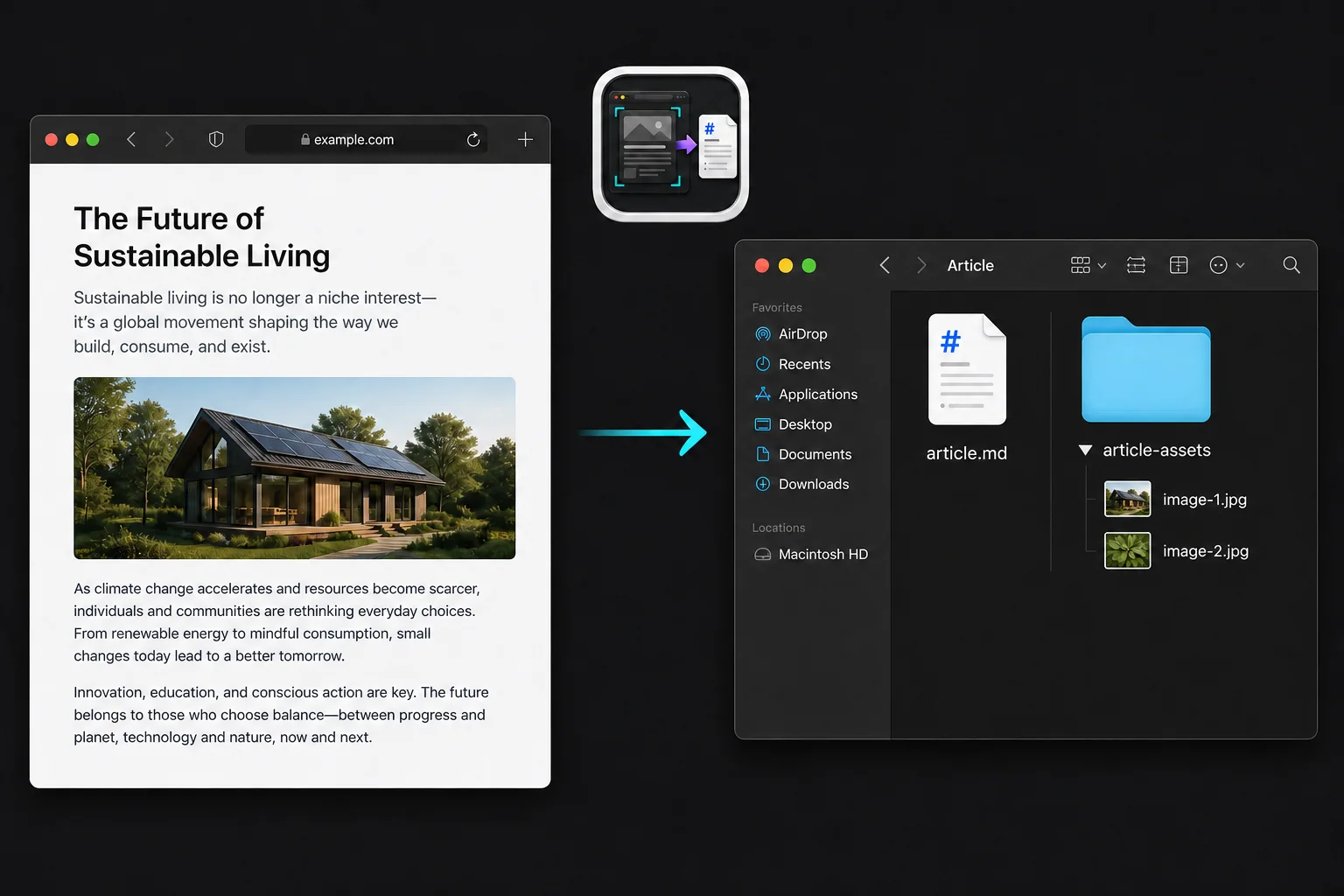
The result
A Safari article becomes files you can inspect.
How it works
Save a Safari article as Markdown in one click.
One click, article only
Click the menu-bar icon on a readable Safari article. Web Clipper pulls out the actual article - nav, ads and sidebars stripped away. Comparing tools? See every way to save a web page as Markdown.
Clean Markdown with front matter
Saved as a .md file with title, url, date and author at the top - ready for any notes app or static site.
Images kept locally
Every image is downloaded into a folder next to the clip and re-linked, so it still reads perfectly with no connection.
Your folder, your files
Choose where clips land - Documents, a vault, anywhere. If Markdown Viewer is your default, each clip opens right there.
The output
Plain Markdown, including its source.
The saved file starts with YAML front matter, followed by the article as Markdown. There is no database export or proprietary wrapper to undo later.
Title, source URL, clip date and author stay with the text. Images use relative links to the local assets folder beside the file.
---
title: "A durable article"
url: https://example.com/article
date: 2026-08-27
author: "Example Author"
tags: []
---
# A durable article
The readable article starts here.
Conversion fidelity
Tables and code stay useful Markdown.
Web Clipper first isolates the readable article, then converts its structure to GitHub Flavored Markdown. The current converter is tested against ordinary article tables and fenced code blocks; it also preserves headings, lists, emphasis and links.
- TablesGFM tables when the source table has a header row
- CodeFenced blocks, plus inline code
- ImagesDownloaded locally and rewritten as relative links
- Not guaranteedInteractive widgets, scripts, complex merged tables or rendered maths
The source URL stays in the file's front matter, so the original page remains traceable when a site uses structure that plain Markdown cannot represent.
The promise
A bookmark rots. A file doesn't.
A read-it-later service can shut down, paywall your queue, or quietly re-render the page. Web Clipper takes the opposite bet: the moment something's worth keeping, it becomes plain Markdown on your disk - no login, no sync, no server that has to still exist next year.
Is it for me?
Use it when the destination is a folder, not a notes platform.
PX7 Web Clipper is for Safari users who want ordinary Markdown files in an ordinary folder. It does not require Obsidian, a browser-extension account or a proprietary library. If you need selected-text capture, Chrome or Firefox support, or Obsidian templates, choose a browser extension instead. This app deliberately clips the full readable Safari article.
Feature summary
- Article extraction. Click the menu-bar icon on a readable Safari article. Web Clipper pulls out the actual article - nav, ads and sidebars stripped away.
- Markdown front matter output. Saved as a .md file with title, URL, date and author at the top - ready for any notes app or static site.
- Local image download. Every image is downloaded into a folder next to the clip and re-linked, so it still reads perfectly with no connection.
- User-selected storage folder. Choose where clips land - Documents, a vault, anywhere. If Markdown Viewer is your default, each clip opens right there.
- Source. Readable Safari articles, from the menu bar
- Output. One .md file with title, URL, date and author
- Image handling. Downloaded next to the clip and re-linked
- Location. Any folder you choose
Details
Product details
- Version1.0.10
- RequiresmacOS 14 or later
- SourceReadable Safari articles, from the menu bar
- OutputOne .md file with title, url, date and author
- ImagesDownloaded next to the clip and re-linked
- LocationAny folder you choose
- PrivacyRuns entirely on your Mac; no account, nothing uploaded
- License€10 once, 7-day trial; one key for up to 7 Macs